Resume Mistakes That Get You Rejected
Most resumes are rejected for one of two reasons: the file could not be read properly, or it was read and said nothing specific. Fix the mechanical problems first, because they decide whether anyone reads the rest.
What are the most common resume mistakes?
- A photo, date of birth and marital status in the header — the biodata habit, and an image where your details should be.
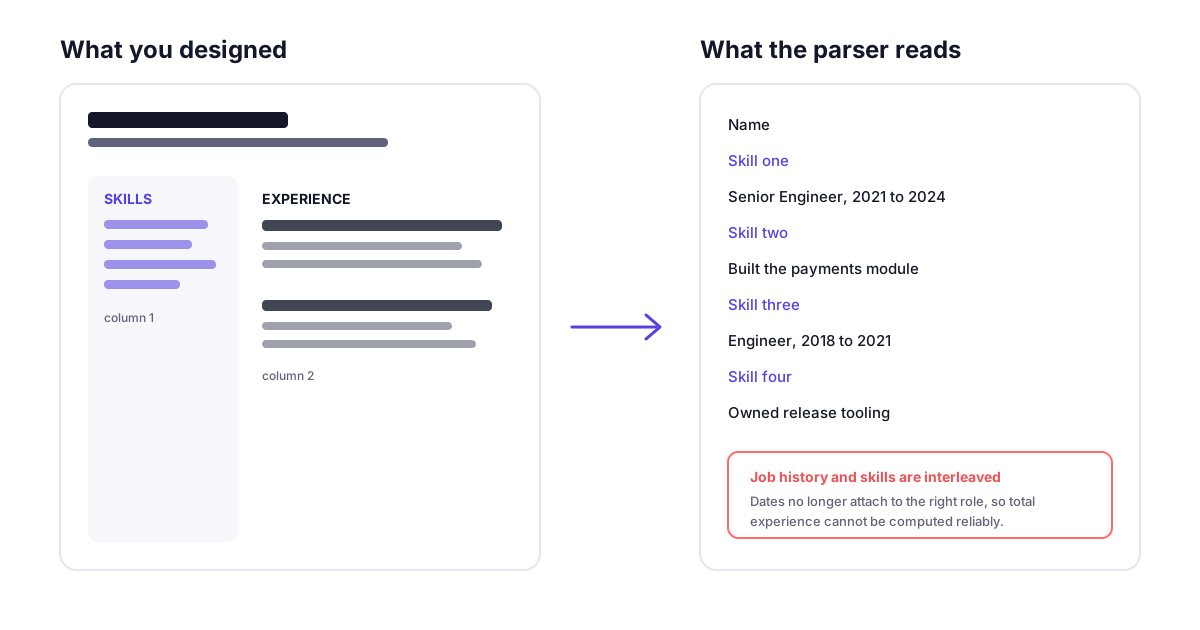
- A two-column layout or content inside tables — parsers read the underlying order, not the visual one, so the profile comes out interleaved.
- Contact details in the Word header or footer — a separate layer of the file that several parsers skip entirely.
- A PDF that is really an image — scanned or flattened on export, so there is no text to extract.
- Internal designations instead of market job titles — a title nobody searches for keeps you out of the result set.
- Responsibilities listed instead of outcomes — every other candidate was responsible for something similar.
- One generic resume sent to every role — matching is done on words, and general wording matches nothing in particular.
The frustrating part of a rejection is that you almost never learn which of these it was. A resume that a parser mangles and a resume that is simply not a fit produce exactly the same silence.
So the list below is ordered by that distinction. The first four are mechanical: they decide whether your resume is read at all, they are unambiguous, and they take an afternoon. The rest are judgement calls about what you wrote, which matter just as much but only once the document is being read. If you want to know which apply to yours before reading further, the free ATS resume checker parses your file the same way and takes about a minute.
The mechanical mistakes: your resume is not being read
1. A photo, date of birth, marital status and father's name in the header
This block is a habit carried over from the biodata format, and it is the single most common difference between an Indian resume and one that parses cleanly. It costs you the most valuable space on page one, and an image sitting in the header region gives a parser a chunk of the document it cannot read as text.
Fix: Delete all of it. Name, phone, email, city, LinkedIn. Nothing else.
2. A two-column layout, or content inside tables
Templates from design sites put a skills sidebar on the left and experience on the right. A parser reads a document in its underlying order, not visually, so a two-column page frequently comes out interleaved: a skill, a job title, another skill, a date. The result is a garbled profile that a recruiter never sees you correct.
Fix: One column, top to bottom. Keep tables out of the document entirely, including invisible ones used for alignment.
3. Contact details in the Word header or footer
Headers and footers are a separate layer of the file. Several parsers skip them, which produces the worst possible outcome: a profile that reads well and has no way to contact you.
Fix: Put your name and contact line in the body of the document, as ordinary text at the top.
4. A PDF that is really an image
A resume that was scanned, photographed, or exported as a flattened image contains no extractable text. Nothing is read. This also happens with some design tools that rasterise on export.
Fix: Open your PDF and try to select a line of text. If you cannot highlight it, re-export from the original file.
These four are worth checking before you fix anything else, because each one can make the rest of the document irrelevant. The free ATS checker reports all four from your actual file, with no sign-up.
The judgement mistakes: your resume is read and says nothing
Internal designations instead of market job titles
"Member Technical Staff 2", "Systems Engineer Specialist" and "Associate Consultant Grade 4" mean something inside one company and nothing in a search. Recruiters filter by the title they are hiring for, so an unrecognisable title keeps you out of the result set entirely.
Fix: Lead with the market title and keep the internal one alongside: "Software Engineer (internally: Member Technical Staff 2)".
Dates that are missing, or written three different ways
"2021-Present", "Jan 21 to date" and "since last year" in the same document give a parser no reliable way to compute total experience. Experience range is one of the most common filters applied before a human reads anything.
Fix: Use the same Mon YYYY - Mon YYYY format everywhere, and never leave a role undated.
One generic resume sent to every role
Matching is done on the words in your document against the words in the posting. A resume written to describe your career in general will not contain the specific phrasing of any particular role, so it matches weakly against all of them.
Fix: Keep one master document and cut a version per target role, echoing the exact terms the posting uses for the skills you genuinely have.
Responsibilities where outcomes should be
"Responsible for managing the payments module" tells a reader what you were assigned. It does not say whether it went well. Every candidate for the role was responsible for something similar, so the line does no work in separating you from them.
Fix: Rewrite as action and result: what you did, what changed, and the number if you have one. Do not invent a number you cannot defend in an interview.
Skills buried inside paragraphs
If your stack only appears inside prose descriptions of past projects, it is harder to match and much harder for a recruiter to scan in the seconds they spend on a first pass.
Fix: Keep a plain, comma-separated skills section with real headings. Group by category if the list is long.
Current and expected CTC printed on the resume
It is still common to put both at the top of an Indian resume. It removes your room to negotiate before a conversation has started, and it invites filtering on a number rather than on fit.
Fix: Leave both off the document. Handle the question when it is asked, in the conversation where you can give it context.
Icons, graphics and skill rating bars
A phone glyph next to your number is an image, not a phone number. A five-star rating for Python conveys nothing measurable to a reader and nothing at all to a parser.
Fix: Plain text labels. If a skill needs a proficiency level, write the level as a word.
Decorative or non-standard fonts
An unusual font can be substituted or, in a few export paths, mapped to characters that extract incorrectly. The downside is real and the upside is nil, because nobody has ever been hired for their typeface.
Fix: A standard system font at 10-12pt for body text.
Length that does not match your experience
Three pages for two years of experience signals padding. One cramped page for twelve years signals that the detail a senior hire is judged on has been cut.
Fix: Roughly one page up to about five years, two pages beyond that. Let the most recent roles take the most space.
An unexplained gap
A gap is not the problem. An unexplained gap is, because the reader fills it in themselves and rarely generously.
Fix: Name it in one line, with dates and what you did: study, caregiving, health, a startup that did not work out. One line closes it.
That is all fourteen. Rather than working down the list blind, check which ones your own file actually has — the free ATS resume checker parses it the same way a screening system does and reports back in about a minute. No sign-up.
What this list deliberately does not claim
You will find pages asserting that a specific percentage of resumes are rejected by software before a human sees them. That figure circulates widely and is rarely sourced. Every item above is instead a mechanism you can verify yourself: open your PDF and try to select the text, or run the file through a parser and read what comes back.
Fixing all fourteen does not make you a match for a role you are not a match for. It removes the reasons to be discarded before the question of fit is reached. That is a smaller claim than most resume advice makes, and it is the one that holds.
Frequently asked questions
Related guides
- Naukri Resume Score Explained (2026) — what each grade means and how the 0-100 score is calculated, which is a different measure from the file-parsing issues above.
- ATS Resume Format for India (2026) — the section-by-section structure to use once you have removed the mistakes on this page.
- How to Answer the Expected CTC Question — what to do instead of printing your CTC on the resume, mistake 10 above.